You keep an older phone whose worn battery usually dies by mid-afternoon. With OPOS, maps and photo backup stay paused while calls and messages stay on. The call that matters in the evening still comes through. This is the scenario the simulation models.
This illustrative vignette was written by Meta Muse Spark 1.3 via Gumloop. It is not a measured phone result. The noon estimate is about 4 h 14 min left; the recorded rules-only noon-to-16:00 run displayed 0% at 16:00 and did not meet the goal.
Try the simulation demo ↗ (opens in a new tab) It runs in your browser with simulated battery, calls and messages; the Muse Glimmer helper is off there. The Glimmer replies further down were captured on Louis’s Mac; this browser demo answers from the battery rules.
In the demo, try the battery features in this order: open the top bar for the 4 PM goal and the time-left estimate; Undo maps at 60%; drag Battery to 20% for the low-battery floor; tick Charging; set Temp to 45°C for the heat floor; then click Plan and Why? in the helper.
Screens from the desktop demo, which simulates the battery, calls and messages.
A prototype phone interface (shell, launcher and battery rules) for older phones with worn batteries, so far tried in a desktop simulation and one postmarketOS virtual machine. At noon, the demo starts at 60% charge and 60% health, about 36% usable, with a 16:00 goal. OPOS pauses less essential work, such as maps and photos backup, toward a time you choose. The recorded rules-only noon-to-16:00 run displayed 0% at 16:00 and did not meet the goal. Optional Muse Glimmer 30B runs on the owner's computer, explains the pauses and can only pause more.
Meta Global AI Developer Hackathon entry
Muse Glimmer 30B on your computer
GPL-3.0-or-later
Calls and messages
The phone tells you what it is doing.
Lock screen
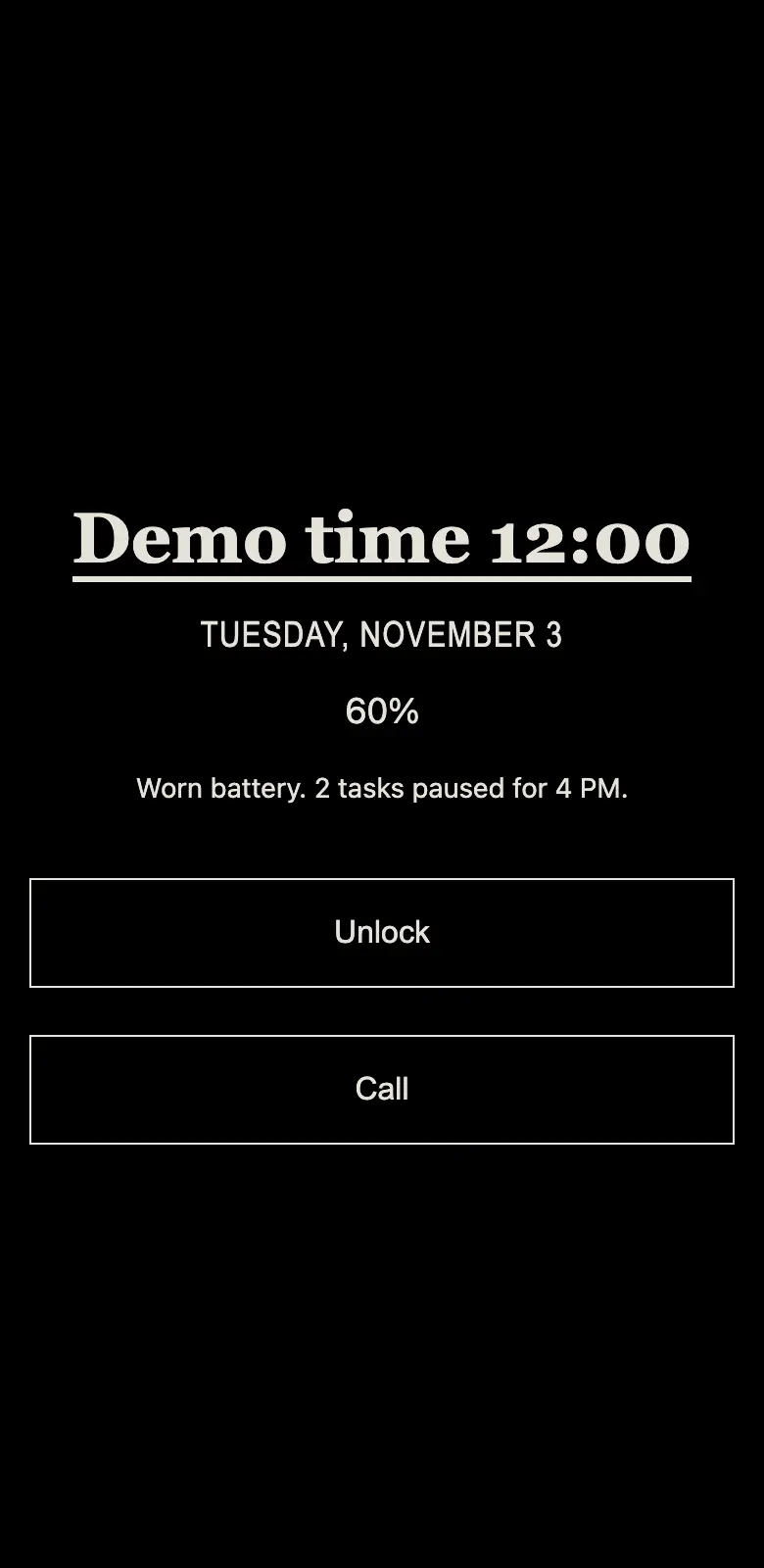
The lock screen tells the battery story.
Charge, battery health and the plan in one line: “Worn battery. 2 tasks paused for 4 PM.”
Home
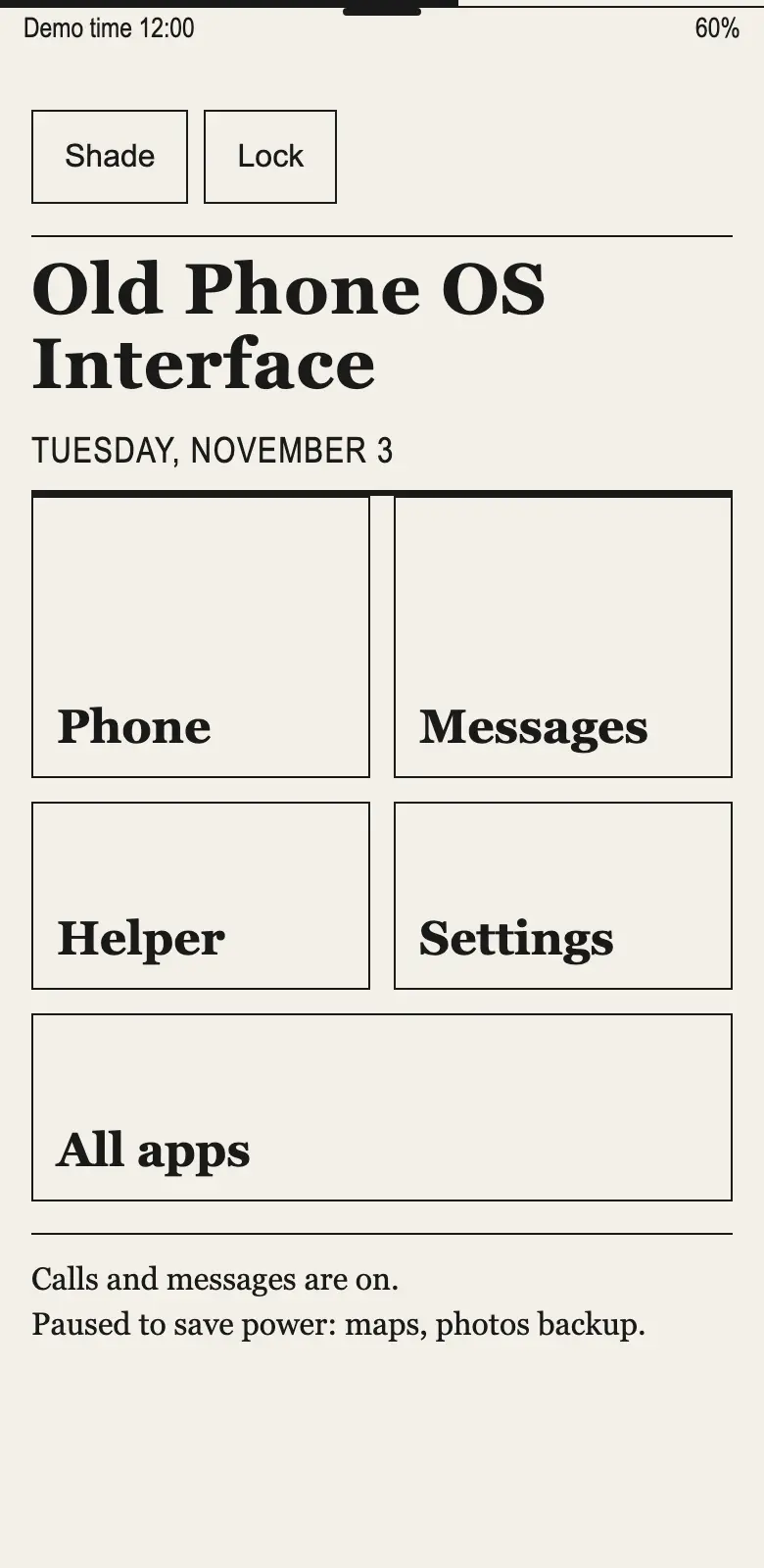
Home reads like a front page.
Big labelled tiles in plain words, and a line that says what is on and what is paused.
Shade
Every pause has a reason.
Pull down from the top edge for the time left, your daily goal and each paused task. Undo clears soft pauses only, such as maps at the starting 60%. Heat, critical battery and the call reserve stay in place.
Helper
Ask why, in plain words.
Optional Muse Glimmer 30B, on the owner's computer, explains the decision from the simulation's facts. It can pause more tasks. It cannot turn a task paused by the rules back on.
Battery health
Worn-battery math
60%charge×60%health≈36%usable
A worn battery holds less than its meter suggests. OPOS multiplies the charge by battery health, so 60% charge at 60% health is planned as about 36% usable.
A less essential task runs only if it fits the energy left until your daily goal. Heat, charging, and a reserve for calls, messages and alarms are part of every decision.
Rules first
Rules decide. The model can only be more careful.
A rule router makes every decision with plain arithmetic, and it works with no model at all. Meta's open-weight Muse Glimmer 30B can suggest pausing more tasks. It can never turn back on anything the rules paused, and it never touches calls, messages or alarms.
Helper
Why, Plan and Ask.
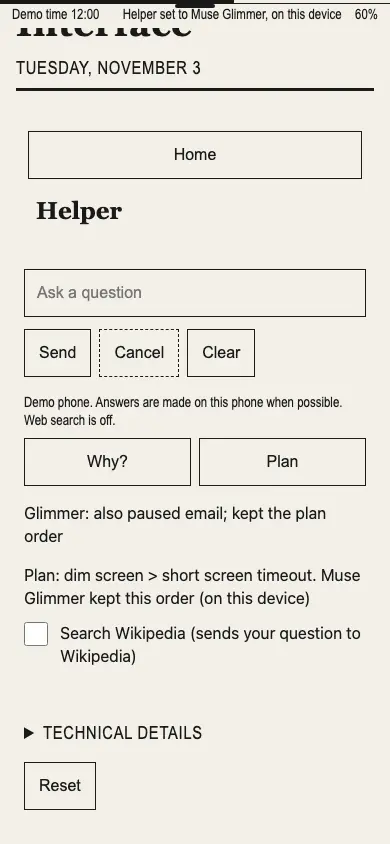
What Glimmer did: it was asked “Why are maps paused?” and it answered from the facts the demo supplied. First dark Ask, 51.699 seconds, on Louis’s MacBook Pro, LM Studio serving muse-glimmer-30b. “On this device” means that Mac.
Asked “Why are maps paused?”, Muse Glimmer answered in 51.699 and 53.077 seconds in dark appearance, and 42.914 and 44.782 seconds in light appearance.
The first dark Ask answer, verbatim:
Maps are paused to save power. The battery is worn at 60% health, so a 60% charge is only about 36% usable and the phone is not charging. The phone paused maps and photos backup to keep calls and messages working until 16:00.
The first dark question was sent while maps and photos backup were paused. By the time the reply appeared, Glimmer’s background advisor had also paused email. The status line reads “Glimmer: also paused email”; the answer describes the facts supplied when the question was sent.
These captures show the first chronological Ask run of each appearance on Louis’s MacBook Pro, with LM Studio serving muse-glimmer-30b. “On this device” means Louis’s Mac running the desktop simulation. This final source has not run on a physical phone; on-phone inference is untested.
Why?
Restates the decision in plain words.
Plan
Suggests an order for the saving steps. It does not run them by itself.
Ask
Answers a question from the phone's facts.
The Why? button returned Glimmer answers in 66.549 and 60.696 seconds in dark appearance, and 63.853 and 78.651 seconds in light appearance. These captures show the first chronological Why? run of each appearance in the desktop simulation.Plan proposes an order and does not run the steps itself. In this light-appearance desktop capture, Muse Glimmer kept the order: dim screen, then short screen timeout.
One simulated battery model
What one battery model suggests.
40 simulated worn phones, one battery and burst model. These runs use the rule router with no model involved.
40 of 40, then 0 of 40 · simulation
Simulated worn phones that cut out suddenly in the first set, then in the set with the full worn-battery reserve and burst shaping. The router's reserve task pauses are in both sets. One battery model; not a phone measurement.
6.54 h vs 5.52 h · simulation, not a measurement
Average working calls with the rule router: 6.54 h with the full reserve and burst shaping, versus 5.52 h in the paired run. The reserve's task pauses apply in both runs.
40 simulated worn phones
in the same battery and burst model: battery health 30–40%, 0–45 °C, starting at 60–100% charge.
One battery and burst model cannot establish real-phone battery life or cut-out rates. No sudden cut-outs in simulation does not show a controlled shutdown on real hardware.
Design language
Jaryo: a phone that reads like a newspaper.
Jaryo is the design language Louis Calata made for OPOS. Text buttons, big left-aligned headings, labelled tiles and thin rules are designed so a web kiosk on a 2 GB phone reads like a printed front page, works with one thumb or a keyboard, and never depends on colour, icons, downloads or a GPU.
01
Simple, but works.
If Jaryo fails, the plain shell still opens Phone and Messages.
02
Text only.
Every control says what it does in words.
03
Two colours.
Ink and paper. Light mode is dark ink on warm paper; dark mode is light ink on black.
04
Editorial.
Masthead, serif headlines, condensed subheads and one-pixel rules.
05
Zoom.
Opening an app zooms into its tile like turning to an article. With reduced motion it becomes a short crossfade.
Masthead
Simple, but works.
Subhead
Body
DefaultPressedUnavailableNoticePrimary
Paper #F3F0E8 Ink #1A1A1A
Night ink #E6E2D9 Black #000000
Tap 100 ms · Page turn 180 ms · Zoom 240 ms · Reduced motion: 120 ms crossfade · Targets: at least 48 px
One thumb
Small things, on your terms.
Dim at night
When you turn it on, the screen dims to 40% from 22:00 to 07:00.
Your top bar
Choose whether the thin bar at the top shows battery, brightness or volume.
Opt in
Nothing leaves the phone unless you ask.
No telemetry or analytics.
The phone screen is served only on the phone's own loopback address, and its controls need a per-session token.
Python standard library only. No other Python packages.
Opt in for more: a Wikipedia search for one question, a helper computer on your private network, or a paid cloud option with your own key.
Desktop demo
A desktop simulation today. Packaged for postmarketOS.
macOS and Linux
A desktop demo that simulates the battery, calls and messages, and needs only Python 3.11 or later. A per-user installer is included.
postmarketOS QEMU image
On November 3, 2026, an aarch64 QEMU image built from the repository booted to the OPOS lock screen, and Unlock reached Home. The packaged renderer hook made this boot possible. The kiosk still simulates the battery, calls and messages; it does not use a real phone's battery or modem.
Prototype
Status
Tested as a desktop simulation and one postmarketOS QEMU image; not on a physical phone.
The QEMU boot does not establish integration acceptance. On-phone model inference and physical-phone battery and modem behavior remain unverified. Emergency calling is not guaranteed; keep another way to call for help.